Wave Accounting Tags: The Complete Guide for Small Business Owners (2026)
For years, Wave Accounting has been one of my favorite bookkeeping platforms for freelancers, consultants, and small service businesses. It has always been simple to learn, affordable compared to many competitors, and packed with enough features for the average business owner to maintain accurate financial records without feeling overwhelmed.
However, there has always been one limitation that prevented me from recommending Wave to certain types of businesses.
Until now.
With the introduction of Wave Accounting Tags, Wave has finally added one of the most requested organizational features to its platform. This new capability allows business owners to organize transactions beyond the traditional chart of accounts, making it possible to analyze projects, locations, properties, marketing campaigns, and much more without making financial reports unnecessarily complicated.
As a professional bookkeeper, I've been especially excited about this release because it closes one of the biggest gaps between Wave and much more expensive accounting software.
In this guide, you'll learn exactly what Wave Accounting Tags are, how they work, who should use them, and whether they make Wave a realistic alternative to QuickBooks for your business.
Why Wave Accounting Needed Tags
Over the past several years, accounting software has become increasingly expensive.
While QuickBooks Online continues to be considered the industry standard, its subscription prices have steadily increased. Unfortunately, many small business owners end up paying for advanced features they'll never actually use.
As someone who helps businesses choose accounting software every day, I find it difficult to recommend paying well over one hundred dollars each month simply to gain access to a handful of advanced reporting features.
Most small businesses don't need dozens of complicated tools.
They need software that's easy to learn, affordable, and capable of producing accurate financial statements.
That's exactly where Wave has traditionally excelled.
At a fraction of the monthly cost, Wave has provided clean bookkeeping, invoicing, receipt tracking, bank feeds, and financial reporting that satisfy the needs of thousands of small businesses.
The one major feature it lacked was a flexible way to organize transactions beyond income and expense accounts.
That's where Wave Accounting Tags completely change the conversation.
What Are Wave Accounting Tags?
Wave Accounting Tags allow you to attach customizable labels to individual transactions.
Think of a tag as an additional piece of information attached to income or expenses.
Instead of only categorizing a transaction as "Office Supplies" or "Advertising," you can also identify why that expense occurred.
For example, you might create tags such as:
Project A
Project B
Rental Property #1
Rental Property #2
Downtown Office
Eastside Office
Facebook Ads
Google Ads
Sales Representative John
Sales Representative Sarah
Every transaction can still be categorized normally using your chart of accounts, but tags provide another layer of organization that exists independently of your financial statements.
This distinction is extremely important.
Your Profit & Loss Statement remains clean and standardized while allowing you to answer much more detailed business questions.
For example:
Which construction project earned the highest profit?
Which rental property generated the most maintenance expenses?
Which marketing campaign produced the greatest return?
Which office location is the most profitable?
How much revenue is each salesperson generating?
Without tags, answering these questions often required creating dozens of extra accounts or exporting data into spreadsheets.
Now, much of that analysis can happen directly inside Wave.
How Wave Accounting Tags Differ from Categories
Many new users wonder why tags are necessary if transactions are already assigned to categories.
The answer comes down to purpose.
Categories exist to produce standard accounting reports.
For example:
Rent Expense
Utilities
Office Supplies
Advertising
Professional Services
These categories determine your Profit and Loss Statement and your tax reporting.
Tags serve a completely different purpose.
They answer operational questions instead of accounting questions.
Imagine purchasing $2,000 worth of lumber for a construction business.
The category would still be "Cost of Goods Sold."
However, the tag might identify whether those materials belong to:
Kitchen Remodel
House Addition
Commercial Renovation
The accounting remains exactly the same.
Only the reporting becomes more insightful.
This separation allows business owners to maintain clean books while gaining much deeper visibility into how different parts of the business are performing.
Why This Is Such a Big Upgrade for Wave
In my opinion, Wave Accounting Tags represent one of the most significant feature releases Wave has made in years.
Before tags, Wave worked exceptionally well for businesses that only needed straightforward bookkeeping.
Examples included:
Freelancers
Consultants
Coaches
Designers
Small agencies
Independent contractors
However, businesses that managed multiple projects often had to upgrade to more expensive accounting software.
Now, many of those businesses can continue using Wave while gaining much of the project-level reporting they previously couldn't access.
Although Tags aren't identical to QuickBooks Classes or Projects, they solve many of the same real-world problems for a significantly lower monthly cost.
For many business owners, that's a tremendous value.
Instead of paying for an enterprise-level accounting platform filled with features they'll never touch, they can continue using Wave's simple interface while still gaining deeper financial insights.
That's exactly the kind of improvement small businesses have been waiting for.
How to Create Wave Accounting Tags
Getting started with Wave Accounting Tags is straightforward. If you're already familiar with navigating Wave, you'll find that the tagging system fits naturally into your existing bookkeeping workflow.
It's worth noting that, at the time of writing, Tags are available exclusively with a Wave Pro subscription. If you're using the free version of Wave, you'll need to upgrade before you can begin creating and using tags.
To create your first tag, log into your Wave account and navigate to the Accounting section in the left-hand navigation menu. You'll notice a new option labeled Tags. Selecting this page will display a list of all the tags you've created, along with options to add new ones.
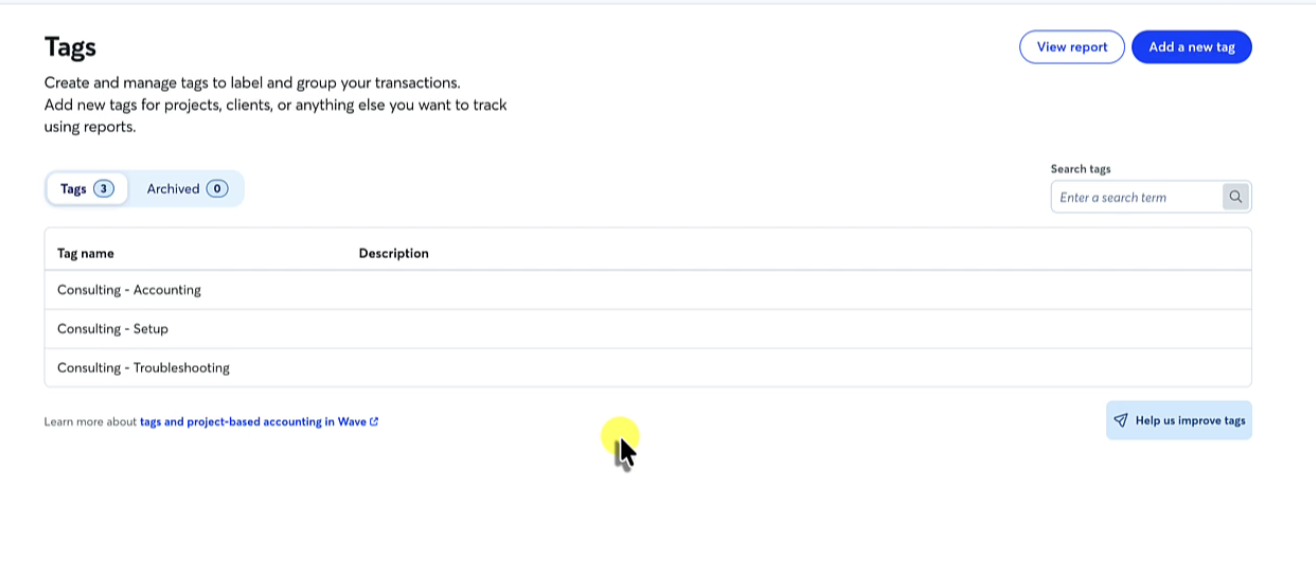
Click Create Tag, give your tag a descriptive name, and optionally include a description to help you or your team remember its purpose.
For example, you might create tags such as:
Project A
Project B
Kitchen Remodel
Rental Property – Maple Street
Downtown Office
Facebook Advertising
Google Advertising
Sales Representative – Emily
The naming convention you choose is entirely up to you, but consistency is important. Developing a standardized naming system early will make your reports easier to understand as your business grows.
Once saved, your tag becomes available throughout Wave whenever you're categorizing transactions.
How to Assign Tags to Transactions
Creating tags is only the first step. The real value comes from consistently assigning them to your income and expenses.
Fortunately, Wave makes this process relatively simple.
When reviewing your bank transactions, open the transaction you want to categorize. After assigning the appropriate income or expense category, select Edit More Details. You'll then see an option to add one or more tags.
Simply search for the tag you've already created and attach it to the transaction.
For example, imagine you're reviewing the following expense:
Vendor: Home Depot
Amount: $2,450
The accounting category might be:
Cost of Goods Sold
Materials Expense
At the same time, you could assign the tag:
Kitchen Remodel
Now, when you generate a tag report later, this expense will automatically be included in the financial results for that specific project without affecting your standard Profit & Loss Statement.
This extra layer of organization is what makes Wave Accounting Tags so powerful. Instead of changing your chart of accounts to answer operational questions, you simply apply a tag.
Save Time with Bulk Tagging
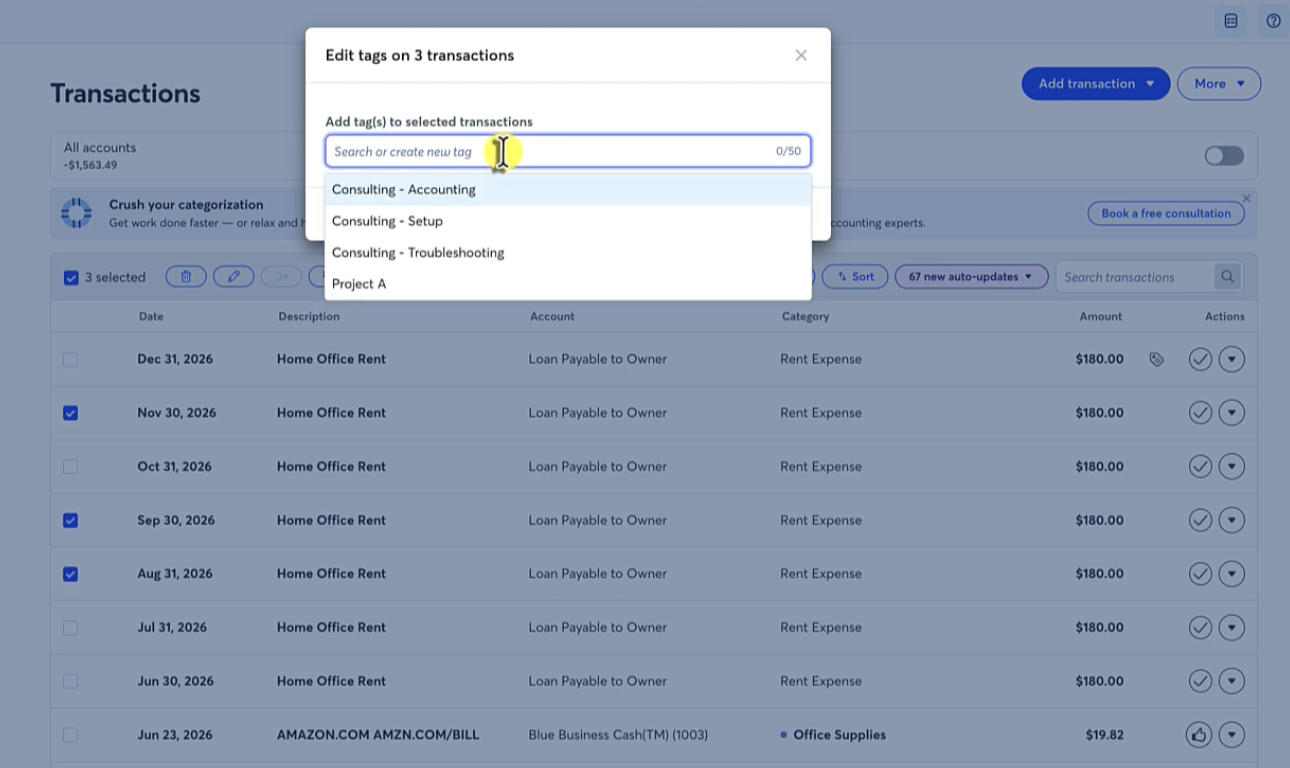
One feature I particularly appreciate is the ability to assign tags to multiple transactions simultaneously.
If you've imported dozens of transactions that all belong to the same project or location, you don't need to edit each one individually.
Instead, select multiple transactions from your transaction list, choose Bulk Tag Transactions, select the appropriate tag, and apply it to every selected transaction.
This can save a tremendous amount of time during monthly bookkeeping, especially for businesses with recurring project expenses or large numbers of vendor payments.
For example, imagine you've just imported an entire month's worth of expenses for a commercial construction project.
Rather than opening each individual purchase, you could select all applicable transactions and apply the project tag in a single step.
For professional bookkeepers and business owners alike, this small feature can significantly improve efficiency.
Using Wave Accounting Tags with Invoices
One area where the new tagging system works a little differently is invoicing.
If you invoice customers directly through Wave, you cannot currently assign a tag from the Transactions page after the invoice has been created in the same way you can with bank transactions.
Instead, you'll need to work directly from the Sales & Payments section.
When creating a new invoice, or editing an existing one, scroll down until you locate the tag field. From there, select the appropriate tag before saving the invoice.
For example, suppose you're invoicing a client for work completed on Project A.
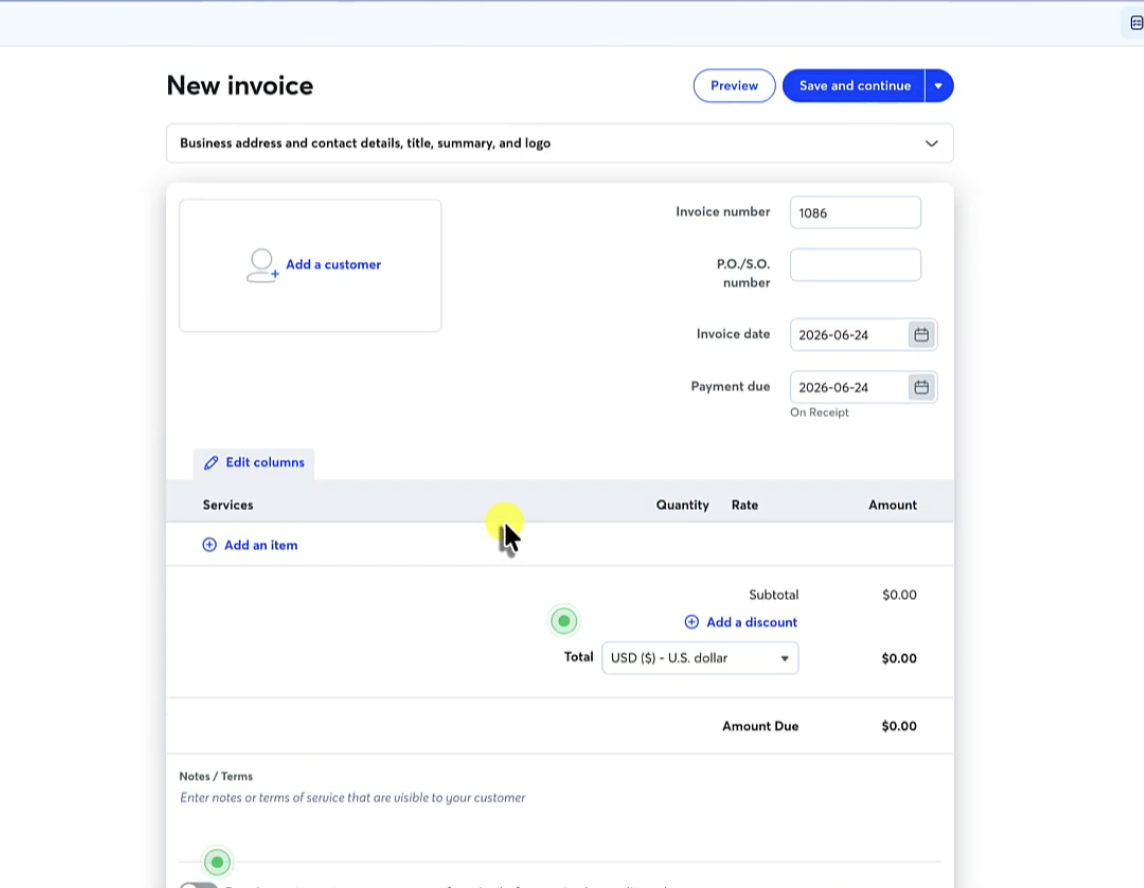
Instead of simply sending the invoice without additional information, you would assign the Project A tag before finalizing it.
Later, when that invoice is paid, both the income and any related project expenses can be analyzed together within the same tag report.
Although this workflow is slightly different from tagging bank transactions, it still provides the flexibility needed to analyze project profitability.
Hopefully, future updates will allow invoice tags to be managed more directly from the transaction feed, creating an even more seamless workflow.
Creating Reports with Wave Accounting Tags
This is where Wave Accounting Tags become truly valuable.
Collecting data is useful, but making informed business decisions requires meaningful reports.
Once you've consistently tagged your transactions, generating reports is remarkably simple.
Return to the Tags page within Wave and select View Report.
You'll first choose the reporting period. This might include:
This Month
Last Month
Quarter-to-Date
Year-to-Date
Custom Date Range
Next, select the tag—or multiple tags—you'd like to analyze.
Wave then generates a report showing all income and expenses associated with the selected tag during the chosen period.
Rather than viewing your business as one large collection of revenue and expenses, you can isolate a specific project, property, location, or campaign and evaluate its financial performance independently.
This provides a level of visibility that previously required much more expensive accounting software.
Filtering Multiple Tags for More Detailed Analysis
Another feature I appreciate is the ability to filter reports using more than one tag at a time.
Instead of analyzing only a single project, you can combine multiple tags to answer more specific business questions.
For example, imagine you assign one tag called:
Project A
And another called:
Subcontractor
You can generate a report that displays transactions matching both tags.
This allows you to answer questions such as:
How much did subcontractors cost on Project A?
Which marketing expenses were associated with a specific campaign?
How much office supply expense was incurred at a particular location?
Which revenue came from a specific salesperson during the quarter?
As businesses grow, these types of questions become increasingly important for improving profitability and making informed management decisions.
Rather than relying on spreadsheets or manual calculations, much of the information can now be accessed directly within Wave.
Exporting Reports for Clients or Advisors
Once you've generated a report, Wave also allows you to export it as a PDF.
This may seem like a small feature, but it opens the door to several practical applications.
For example, contractors can provide project profitability reports to business partners. Rental property owners can review individual property performance before making investment decisions. Bookkeepers can share project summaries with clients during monthly financial reviews.
Having professional-looking reports readily available makes it easier to communicate financial information with accountants, tax professionals, lenders, investors, or management teams.
More importantly, these reports transform bookkeeping from simply recording history into providing actionable business insights.
That's ultimately where Wave Accounting Tags deliver their greatest value.
Real-World Ways to Use Wave Accounting Tags
One of the biggest strengths of Wave Accounting Tags is their flexibility. Unlike fixed reporting categories, tags can be customized to match how your business operates. Whether you're managing projects, tracking locations, or evaluating marketing performance, tags give you another layer of insight without cluttering your accounting records.
Let's look at a few practical examples.
Construction Companies
Construction businesses often have multiple jobs running simultaneously. While your Profit and Loss Statement tells you how the company performed overall, it doesn't necessarily tell you whether each project was profitable.
With Wave Accounting Tags, you can create a unique tag for every job.
For example:
Kitchen Remodel – Johnson Residence
Office Renovation – Downtown
New Home Build – Maple Street
Every material purchase, subcontractor payment, equipment rental, and customer invoice can be assigned to the appropriate project tag.
At the end of the project, you'll have a report showing total revenue, total expenses, and net profit for that specific job. This makes estimating future projects much easier because you'll have historical financial data to reference rather than relying on guesswork.
Rental Property Owners
Real estate investors are another group that can benefit tremendously from Wave Accounting Tags.
Suppose you own five rental properties. Your bookkeeping categories might include Repairs & Maintenance, Utilities, Insurance, Property Taxes, and Mortgage Interest.
Without tags, all of those expenses appear together on your financial statements.
By creating a tag for each property, you can quickly answer questions like:
Which property generated the most maintenance costs?
Which property produced the highest cash flow?
Which property has become less profitable over time?
Instead of maintaining separate accounting files or creating duplicate expense accounts, you simply assign the correct property tag to each transaction.
Marketing Agencies
Marketing agencies frequently manage multiple client accounts simultaneously.
Each client's revenue and expenses can be tagged individually, allowing agency owners to evaluate the profitability of every engagement.
For example:
Client – ABC Dental
Client – Northwest Roofing
Client – Smith Law Firm
This makes it much easier to determine which clients are the most profitable and where additional resources should—or shouldn't—be invested.
Consultants and Professional Service Firms
Consultants often work on multiple engagements throughout the year.
Rather than simply tracking total consulting income, tags allow you to evaluate each consulting project independently.
This information can help answer questions like:
Which engagements produced the highest profit margins?
Which projects required more hours than expected?
Which clients generate the greatest long-term value?
These insights can lead to better pricing decisions and improved resource allocation.
Businesses with Multiple Locations
If your company operates from more than one location, Wave Accounting Tags can also simplify location-based reporting.
Imagine you own three coffee shops or retail stores.
Instead of creating separate accounting files or dozens of duplicate expense accounts, you can tag transactions by location while maintaining one clean set of financial statements.
Later, you can compare each location's performance to identify opportunities for growth or cost savings.
Best Practices for Using Wave Accounting Tags
Like any bookkeeping system, tags are only as useful as the data you put into them.
To get the most value from Wave Accounting Tags, I recommend following a few simple best practices.
Create a Standard Naming Convention
Decide how you'll name your tags before you begin using them.
For example, instead of mixing names like:
Project A
Johnson Remodel
Job 105
Remodel
Choose one consistent format and stick with it.
Consistency makes reports easier to read and reduces confusion as your business grows.
Only Create Tags That You'll Actually Use
One common mistake is creating dozens of tags "just in case."
Over time, this creates unnecessary complexity.
Instead, focus on tracking information that helps you make better business decisions.
Ask yourself:
"Will this information influence how I run my business?"
If the answer is no, you probably don't need a tag for it.
Tag Transactions Consistently
Perhaps the biggest limitation of any tagging system is that it's only effective when used consistently.
If some project expenses are tagged while others aren't, your reports become incomplete.
Whether you're doing your own bookkeeping or working with a professional bookkeeper, establish a routine for reviewing transactions and confirming that all relevant items have been tagged before closing each month's books.
Review Tag Reports Regularly
Don't wait until tax season to look at your reports.
One of the greatest benefits of bookkeeping is using financial information to make better decisions throughout the year.
Reviewing your tag reports monthly can help you identify:
Projects that are becoming unprofitable
Rising costs before they become major issues
High-performing marketing campaigns
Strong-performing business locations
Opportunities to improve pricing
Bookkeeping shouldn't simply record history—it should help guide future decisions.
Pros and Cons of Wave Accounting Tags
After spending time exploring this feature, here are my biggest takeaways.
Pros
The biggest advantage is flexibility.
Tags allow you to create customized reports without changing your chart of accounts or your standard financial statements. This keeps your books clean while giving you much more meaningful business insights.
I also appreciate how easy the system is to learn. If you're already comfortable using Wave, adding tags requires very little additional training.
Bulk tagging saves time, especially when working with large numbers of transactions, and the reporting interface is simple enough for most small business owners to understand without an accounting background.
Most importantly, this feature makes Wave a much stronger option for project-based businesses that previously needed more expensive accounting software.
Cons
No software feature is perfect, and Wave Accounting Tags still have room to improve.
One limitation is the invoice workflow. Because invoice tags are managed separately from bank transactions, it's easier to forget to assign them if you don't have a consistent process.
Another challenge is that Wave currently doesn't notify you when a transaction that should be tagged is missing a tag.
Unlike some enterprise accounting systems, there isn't an automated reminder or AI-powered suggestion to identify incomplete tagging.
As your business grows, maintaining accurate tag reports depends entirely on consistent bookkeeping habits.
Fortunately, that's a process issue—not a limitation of the reporting itself.
Is Wave Accounting Now a Serious Alternative to QuickBooks?
For many small businesses, I believe the answer is yes.
QuickBooks Online is still an outstanding accounting platform, particularly for businesses with highly complex accounting needs, inventory management, advanced automation, or industry-specific workflows.
However, many entrepreneurs don't need every feature QuickBooks offers.
If you're a consultant, contractor, freelancer, agency owner, rental property investor, or another service-based business, Wave now provides much more reporting flexibility than it did previously.
With the addition of Wave Accounting Tags, the gap between the two platforms has become significantly smaller.
Considering Wave Pro's affordable monthly price, this feature adds tremendous value for business owners looking for professional bookkeeping tools without paying enterprise-level subscription costs.
Final Thoughts
I'm genuinely excited about the future of Wave Accounting.
Over the years, I've recommended Wave to many entrepreneurs because it's intuitive, affordable, and approachable for business owners who don't have an accounting background.
The addition of Wave Accounting Tags addresses one of the platform's biggest limitations by giving users a simple way to organize projects, properties, locations, marketing campaigns, and other operational data without making their bookkeeping more complicated.
If Wave continues expanding this feature with additional automation, smarter reporting, and deeper integrations, I believe it will become an even stronger competitor in the small business accounting space.
As someone who spends every day helping entrepreneurs understand their numbers, I love seeing accounting software become more powerful while remaining easy to use.
Need Help Setting Up Wave Accounting?
Choosing accounting software is only the first step. A well-designed bookkeeping system can save hours of work each month while giving you reliable financial information to make better business decisions.
At Profit Logic, I help small business owners across the United States set up and maintain bookkeeping systems using both Wave Accounting and QuickBooks Online. Whether you're starting from scratch, cleaning up messy books, or deciding which software is right for your business, I'm here to help.
If you'd like personalized bookkeeping support or help implementing Wave Accounting Tags, feel free to reach out. I'd be happy to help you build a bookkeeping system that's accurate, organized, and designed to grow alongside your business.
Frequently Asked Questions About Wave Accounting Tags
What are Wave Accounting Tags?
Wave Accounting Tags are customizable labels that can be attached to income and expense transactions. They allow you to track projects, properties, locations, marketing campaigns, or other business activities without changing your chart of accounts.
Are Wave Accounting Tags included in the free version of Wave?
No. At the time of writing, the Tags feature is available only with a Wave Pro subscription.
Can I assign multiple tags to a transaction?
Yes. Wave allows you to assign more than one tag to a transaction, making it possible to create more detailed reports by filtering for multiple tags.
Do Wave Accounting Tags affect my Profit and Loss Statement?
No. Tags exist separately from your accounting categories, so they don't change your financial statements. Instead, they provide additional reporting for specific projects or business activities.
Are Wave Accounting Tags a replacement for QuickBooks Classes?
Not exactly, but they accomplish many of the same goals for small businesses. If your primary need is tracking project or location profitability, Wave Accounting Tags provide a practical and affordable alternative.
Conclusion
The introduction of Wave Accounting Tags is one of the most significant improvements to Wave Accounting in recent years. By giving business owners the ability to organize transactions by projects, properties, locations, marketing campaigns, or virtually any other category they choose, Wave has expanded its reporting capabilities without sacrificing the simplicity that has made the platform so popular.
For many freelancers, consultants, contractors, agencies, and real estate investors, this feature fills a gap that previously required upgrading to more expensive accounting software. Instead of creating a cluttered chart of accounts or maintaining complex spreadsheets, you can now generate meaningful reports that help you understand exactly where your business is making—and spending—money.
While the feature still has room to grow, particularly with automated reminders for untagged transactions and a more streamlined invoice workflow, it's an excellent first step. If Wave continues building on this foundation, I believe it will become an even stronger competitor to more expensive bookkeeping platforms.
Ultimately, bookkeeping isn't just about staying organized for tax season—it's about using your financial data to make smarter business decisions. Wave Accounting Tags provide another valuable tool for turning your bookkeeping into actionable insights that can improve profitability and support long-term growth.
If you're already using Wave Pro, I encourage you to start experimenting with tags in your own business. Whether you're tracking client projects, rental properties, or multiple business locations, this simple feature can provide a much clearer picture of your financial performance.
And if you need help setting up Wave Accounting, cleaning up your books, or creating a bookkeeping system that grows with your business, Profit Logic is here to help. We specialize in helping small business owners simplify their finances so they can spend less time on bookkeeping and more time growing their business.