How to Do Job Costing in Wave Accounting
Can Contractors Use Wave Accounting? Two Ways to Track Job Costs Without QuickBooks
QuickBooks has become significantly more expensive over the last few years, especially with the addition of new AI features that many small business owners may never actually use. As subscription costs continue to rise, many contractors and small business owners are looking for more affordable alternatives.
One option that frequently comes up is Wave Accounting.
At around $16–$19 per month, Wave is one of the most affordable bookkeeping software solutions available. It offers a clean, user-friendly interface that many non-accountants can learn quickly without a steep learning curve.
However, there is one major challenge for contractors.
Wave does not include built-in project tracking or job costing features.
If your business relies on tracking profitability across multiple jobs, construction projects, or client engagements, that limitation can create some challenges. Fortunately, there are still ways to make Wave work for your contracting business.
In this article, I'll walk you through two practical approaches for tracking project income and expenses in Wave.
The Main Limitation: No Native Job Costing
Job costing allows contractors to track income, labor, materials, subcontractors, and other expenses for individual projects.
This information helps answer important questions such as:
Which projects are most profitable?
Are material costs exceeding estimates?
Which clients generate the highest margins?
How much profit did a specific job produce?
While software like QuickBooks Online Plus offers dedicated project tracking, Wave currently does not.
There are no project management features, and there is no ability to create account subcategories within the chart of accounts.
That doesn't mean you're out of options.
Method 1: Create Separate Accounts for Each Project
The first method is the approach most closely aligned with Wave's own recommendations.
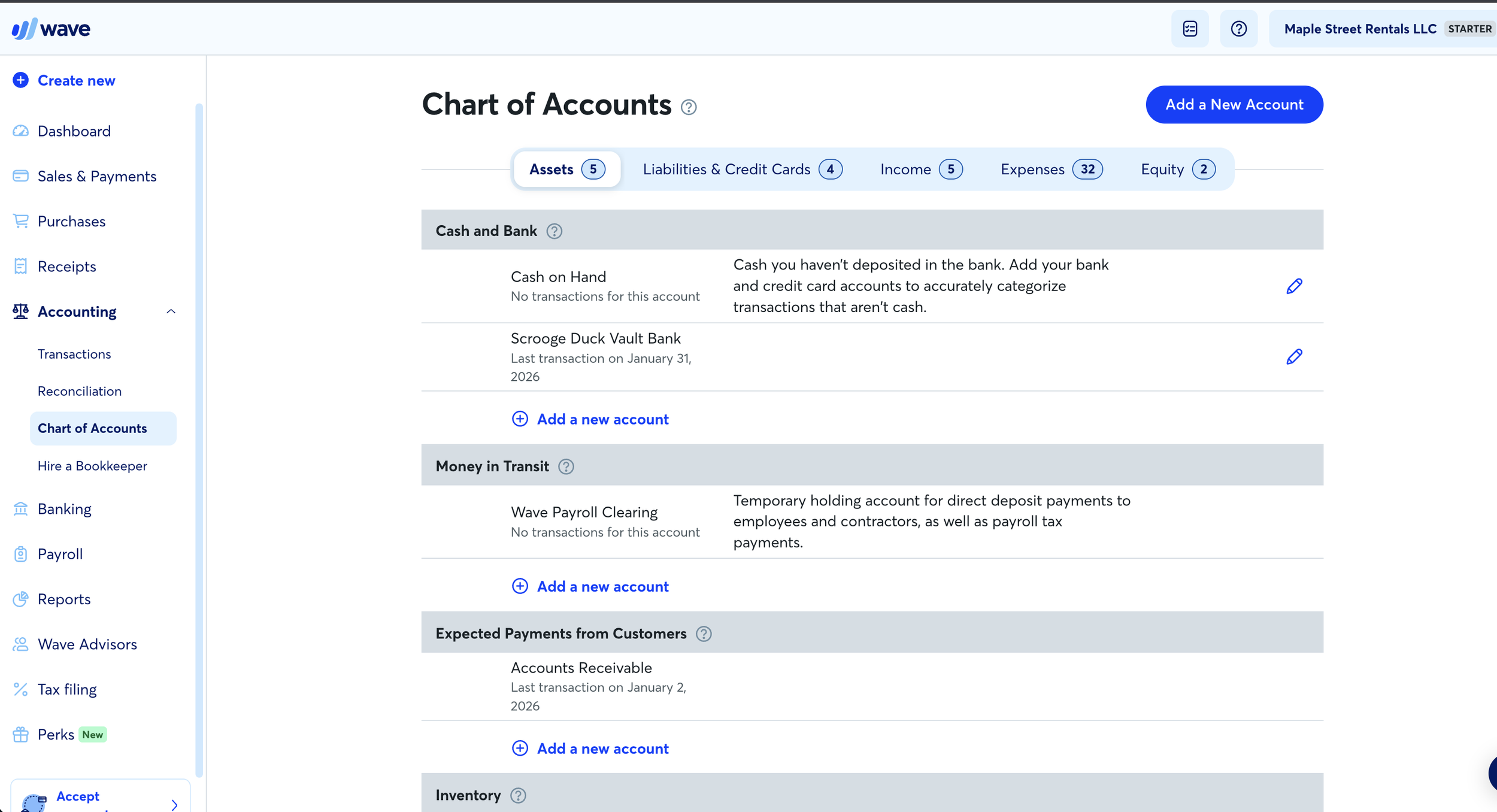
Instead of using project tracking features, you'll create separate income and expense accounts in the Chart of Accounts for each project.
Step 1: Create a Project Income Account
Suppose you have a roofing project for a customer named John A.
You could create an income account called:
Project John A Income
Whenever you receive payments related to that project, you'll categorize those transactions into this account.
Step 2: Create a Project Expense Account
Next, create a Cost of Goods Sold account called:
Project John A Expenses
Any materials, subcontractor costs, permits, or other direct project expenses would be categorized here.
It's important to place these expenses under Cost of Goods Sold rather than general operating expenses.
For contractors, direct project costs are part of delivering the service to the customer and should be separated from overhead expenses such as:
Rent
Utilities
Office supplies
Software subscriptions
Administrative costs
Example
Let's assume the following transactions occur:
Income
Customer payment from John A: $15,000
Expenses
Roofing materials: $4,000
Roofing subcontractor: $3,000
By categorizing these transactions into the dedicated John A accounts, your Profit & Loss statement will show:
Income
Project John A Income: $15,000
Cost of Goods Sold
Project John A Expenses: $7,000
This allows you to quickly estimate project profitability directly from your financial statements.
Scaling to Multiple Projects
Suppose you also have another customer named Harvey B.
You would create:
Project Harvey B Income
Project Harvey B Expenses
Your Profit & Loss statement would then display separate line items for each project.
This gives you basic project-level reporting without needing specialized software.
Advantages
Keeps everything inside Wave
No additional software required
Project profitability is visible directly on financial reports
Disadvantages
Your chart of accounts can become very large
Profit & Loss reports become longer and harder to read
Managing dozens of projects becomes cumbersome
For contractors handling only a few projects at a time, this approach can work surprisingly well.
Method 2: Use Wave for Bookkeeping and a Separate Tool for Job Costing
The second approach is often the one I recommend most frequently.
Instead of creating separate accounts for every project, use Wave strictly for bookkeeping and use another system to track project profitability.
This could include:
Excel
Google Sheets
Other project management software
Simplify Your Chart of Accounts
Under this method, all project revenue is categorized into a general account such as:
Job Income
Direct project expenses are categorized into broader Cost of Goods Sold accounts such as:
Parts and Materials
Subcontractor Expense
Equipment Rental
Other Job Costs
Your financial statements stay clean and easy to read.
Track Projects Separately
Then use a spreadsheet or project management platform to track:
Estimated costs
Actual costs
Labor hours
Material purchases
Change orders
Project profitability
This gives you far more flexibility than Wave can provide on its own.

Reconcile the Numbers Monthly
One important best practice is to reconcile your project tracking system with Wave every month.
At month-end:
Calculate total project revenue from your spreadsheet or job costing software.
Compare it to total Job Income in Wave.
Compare total project expenses to your Cost of Goods Sold accounts.
Investigate and correct any differences.
This ensures your bookkeeping and project tracking remain aligned.
Advantages
Cleaner financial statements
Better project-level detail
Easier to scale as your business grows
Access to more advanced project management tools
Disadvantages
Requires maintaining two systems
Additional data entry may be necessary
Requires monthly reconciliation
Which Method Is Better?
From a bookkeeping perspective, keeping everything in one system is generally ideal.
However, from an operational standpoint, contractors often need more detailed project tracking than Wave can currently provide.
If you only manage a handful of projects each year, creating separate accounts for each project may be sufficient.
If you're managing multiple jobs simultaneously and need detailed job costing, estimates, budgeting, and profitability analysis, using a dedicated project tracking tool alongside Wave is usually the better solution.
Final Thoughts
Wave remains one of the most affordable and user-friendly accounting platforms available for small business owners. While it isn't designed specifically for contractors, there are practical workarounds that can help you track project profitability without upgrading to a more expensive accounting platform.
The right approach depends on your business size, the number of projects you manage, and how detailed your job costing needs to be.
The most important thing is choosing a system you'll actually use consistently. Perfect bookkeeping software that never gets updated is far less valuable than a simple system that stays current and accurate.
If you're struggling with bookkeeping, job costing, or setting up Wave for your contracting business, consider working with a professional bookkeeper who can help create a system that fits your workflow and provides the financial information you need to make better business decisions.
At Profit Logic, we help small business owners organize their books, understand their numbers, and build accounting systems that support growth. If you'd like a review of your current bookkeeping setup and recommendations for improving it, we'd be happy to help.
This version is optimized for a blog audience, improves readability, and targets keywords such as "Wave Accounting for contractors," "job costing in Wave," and "Wave vs QuickBooks for contractors."